


Equilab: Horse & Riding App
4.8543.00 Reviews
App Specs
- Version
- 9.260729.16020
- Updated On
- License
- Free
- Downloads
- 500,000+
- Developer
- Equestrian Insights
- Categories
- Sports
- Platform
- Android, iOS
Screenshots
 Analysis by AppCompare
I approach Equilab: Horse & Riding App as a practical companion for riders who want more than a map of where they have been. Its mix of ride records, horse information, training tools and a safety option gives it a clear purpose, but those tools work best when they support good decisions at the stable rather than replace them. I’d treat the app as a useful record keeper and planning aid, not as a coach or a substitute for attentive riding.
A riding tool with a specific kind of trust
Equilab is a free sports app from Equestrian Insights, and its focus is refreshingly narrow: it is built around horses and riding rather than general fitness. That distinction matters. A standard running tracker can map a route and log activity, but it has little context for a horse’s workload or a rider’s training routine. Equilab is meant to bring those pieces together in one place.
The app has an average rating of 4.7 from around 8,500 ratings, with roughly 530 written reviews and over 500,000 installs. Those figures suggest that many riders have found a reason to keep using it, though popularity alone cannot tell me whether a particular feature will suit someone’s stable routine. It is rated for Everyone, and it offers optional in-app purchases priced from $9.99 to $99.99 per item, so I would check what is included before committing to a paid option.
What the app can—and cannot—tell you
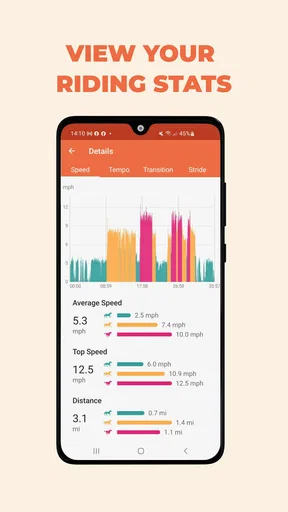
GPS ride recording is most useful to me as a way to compare sessions over time, not to judge a ride by a single number. A route and its recorded speed, duration and distance can help me notice a change in routine or remember where a session went well. But those figures are only context. They do not explain whether a horse was comfortable, whether footing was suitable, or whether a training choice was right. I would use the record to prompt a conversation with a trainer or a closer look at the horse, not to make a welfare decision on its own.
The same caution applies to horse profiles and workload analytics. Keeping details and goals together can make it easier to see how a horse’s activity fits into the bigger picture, especially if I ride more than one horse or share care with someone else. The practical value depends on entering information consistently. If rides are skipped or recorded unevenly, the overview can become misleading; a neat chart is only as dependable as the habits behind it.
Safety is a backup, not a rescue plan
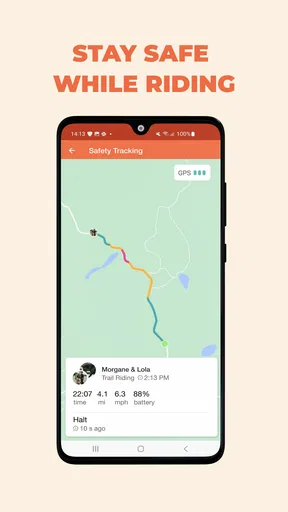
The option to alert a designated contact if I have not returned when expected is a thoughtful addition, especially for solo rides. I would still agree on a clear check-in plan with that person and make sure they know what to do if an alert arrives. A phone app should not be treated as guaranteed emergency coverage: battery life, signal, device settings and the rider’s ability to use a phone can all affect a real situation. I see the feature as one layer in a broader safety routine, alongside telling someone the route and expected return time.
That is also where a rider should pause and consider privacy. Location-based ride records are personal, and sharing a route or activity with a community is a choice to make deliberately. I would review the app’s visible sharing and account controls during setup, keep posts limited to what I am comfortable showing, and avoid assuming that a social feature is private just because it is aimed at equestrians. The useful question is not only what the app can record, but who can see what I choose to share.
Worth Reading Before You Choose

Flipboard Shows What News Apps Must Do Beyond the Feed

Switching to Android Auto Means Rethinking Your Driving Routine

Google Calendar Makes a Crowded Week Easier to Manage

Ludo King Makes the Most of the Minutes Between Plans

Baby Panda World Brings Quick Play to Modern Phones, but Its Game Library Feels Busy

ESPN’s Live Game View Makes Following Close Games Easier
Where it fits in an everyday routine
Imagine I have a short schooling session after work and a longer ride planned for the weekend. I can use the first record as a reminder of what I worked on, then look back before the next session rather than relying on memory alone. For the longer outing, a saved route history can help me recall the path and compare the shape of the ride with earlier outings. The app is most helpful when I add a quick note or use the record to plan a sensible next step; opening a session later just to admire totals offers less value.
A small but useful habit is to check the phone before mounting: confirm that the battery is adequate, location access is available if I want a GPS record, and the safety contact arrangement still makes sense for that ride. I would also start tracking only once I am ready to ride, then end the session deliberately afterward. Those simple checks reduce the chance of an incomplete record and help keep phone handling out of the ride itself.
Who is likely to get the most from it
I think Equilab makes the most sense for riders who enjoy reviewing their routines, manage activity across horse profiles, or want a convenient place to collect ride history. A newer rider may appreciate having a record to discuss with an instructor, while a more experienced rider may use it to spot broad patterns across training weeks. In either case, the human judgment around the horse remains central; an app can organize observations but cannot interpret every detail of a session.
It may be less appealing if a rider wants a completely hands-off experience, dislikes sharing or account-based tools, or only needs a basic route map. A standard GPS tracker may be simpler for someone who has no use for horse profiles or equestrian community features. Likewise, riders who already keep reliable notes in a stable diary may not gain enough from entering the same information twice. I would try to make one feature part of an existing routine before building a whole new record-keeping system around it.
Where I’d be cautious before relying on it
Equilab’s version 9.260203.15793 supports devices running Android 8.0 or later. That gives Android users a straightforward compatibility point to check before downloading. The app is also available on iOS, making it relevant to riders using either mobile platform, but my practical advice is the same on both: test the recording and safety workflow in a familiar, low-pressure setting before depending on it for a solo outing.
Because the app combines tracking, horse management, community and safety functions, it can feel more involved than a single-purpose ride logger. I would not turn on every option simply because it is available. Start with the ride record, see whether the history is genuinely useful, and then decide whether profiles, goals or sharing add value. If the app requests access or presents choices, read them in context and grant only what is needed for the feature I intend to use. That approach keeps the experience purposeful and leaves me more comfortable with what I am recording.
For riders wondering whether they need a subscription, I would first identify the feature that matters to them and check whether it is part of the free experience or an optional purchase. The free starting point makes it possible to explore the app without an upfront price, while the listed purchase range is broad enough that I would not assume every paid option offers the same value. I would pay only if a specific tool solves a recurring problem in my riding routine.
Your Riding Companion
First off, downloading and setting up Equilab is a breeze. It's available on both Android and iOS, so no matter your device, you’re covered. Once you’ve got it up and running, the app’s sleek and intuitive design makes navigation a cinch. You’ll find everything you need to track your rides, monitor your horse's activity, and even connect with fellow equestrians.
Tracking Your Rides
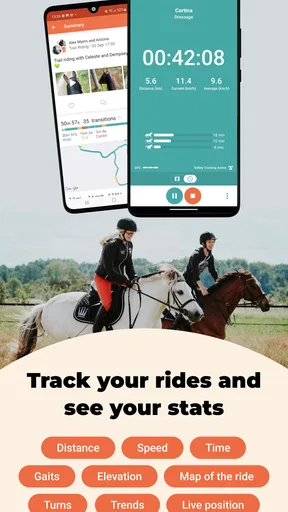
Let’s talk about one of the app’s standout features: ride tracking. With GPS functionality, Equilab records your route, speed, time, and distance. It’s like having a fitness tracker for your horse! I found this particularly useful for analyzing my riding patterns and adjusting my training sessions accordingly. Plus, it’s pretty cool to look back at your ride history and see how far you’ve come.
Horse Profiles and Analytics
Creating a profile for your horse is straightforward. You can input all sorts of details like age, breed, and training goals. The app then uses this information to provide tailored insights and recommendations. The analytics aspect is super helpful for keeping tabs on your horse’s workload, ensuring they aren’t over or underworked.
Community and Sharing
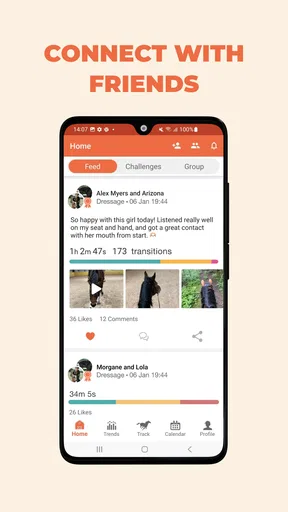
One of the aspects I didn’t expect to love as much as I do is the community feature. You can connect with other riders, share your experiences, and even join groups. It’s like a social network just for horse enthusiasts. Whether you’re looking for advice or just want to share a particularly scenic trail you discovered, this feature is a great way to interact with like-minded people.
Safety First
Safety is always a top priority when riding, and Equilab understands that. The app includes an alert feature that can notify a designated contact if you haven’t returned from a ride as expected. It’s an extra layer of security that offers peace of mind, especially if you often ride alone.
Training and Goals
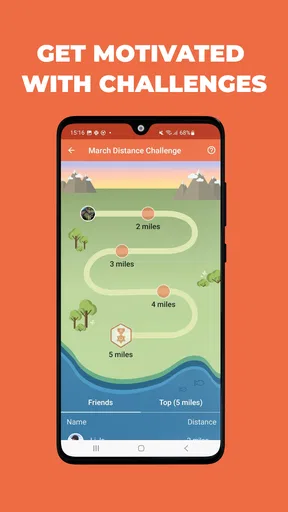
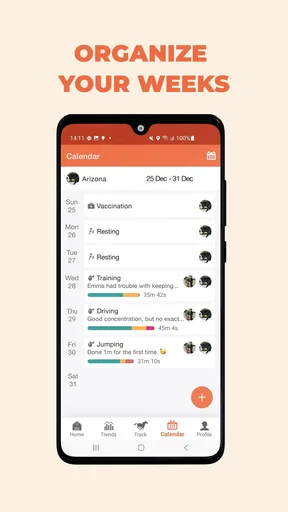
Setting and tracking goals is another area where this app shines. Whether you’re preparing for a competition or just aiming to improve your skills, the app helps you set achievable targets and monitors your progress. I found this feature particularly motivating on days when I needed an extra push to get out there and ride.
Why You’ll Love It
What truly sets Equilab apart is its ability to cater to riders of all levels. Whether you’re a newbie or a seasoned competitor, there’s something here for you. The combination of tracking, analytics, and community engagement makes it a comprehensive tool for anyone serious about their riding journey.
In conclusion, if you’re looking for an app that enhances your riding experience while keeping you connected to a vibrant community, Equilab: Horse & Riding App is definitely worth a download. It’s like having a riding buddy in your pocket, ready to help you every step of the way. So saddle up and give it a try!
Pros
- Tracks riding sessions accurately
- User-friendly interface
- Connects with other riders
- Detailed performance analytics
- Works offline effectively
Cons
- Limited features in free version
- Occasional GPS inaccuracies
- No integration with smartwatches
- In-app purchases can be pricey
- Requires constant updates
FAQs for Equilab: Horse & Riding App
What features does Equilab offer to enhance my riding experience?
Equilab provides a comprehensive suite of features designed to improve your riding experience. It tracks your rides using GPS, offers detailed analytics on your performance, and even allows you to set goals. Additionally, it includes a social feature where you can connect with other riders, share your progress, and gain insights from the community.
Is Equilab suitable for beginners, or is it more geared towards experienced riders?
Equilab is versatile and caters to both beginners and experienced riders. Beginners can benefit from the app's user-friendly interface and basic tracking features, while experienced riders can delve into advanced analytics and goal-setting capabilities. It’s designed to grow with you as your skills improve.
How accurate is the GPS tracking feature in Equilab?
The GPS tracking in Equilab is highly accurate, providing detailed insights into your riding sessions. It records your route, speed, and distance, allowing you to review your performance with precision. However, as with any GPS-based app, accuracy can vary slightly based on your device and signal strength.
Does Equilab require a subscription, and what are the benefits of upgrading?
Equilab offers both a free version and a premium subscription. The free version includes basic tracking and analytics, while the premium version unlocks additional features such as advanced analytics, personalized training plans, and detailed ride history. Subscribing enhances your experience with more in-depth insights into your riding.
Can Equilab be used offline, or does it require an internet connection?
Equilab can be used offline for tracking rides, which is great if you’re in an area with poor connectivity. However, to access certain features like syncing data to the cloud, sharing with friends, and community interactions, an internet connection is required. This ensures all your data is up-to-date and accessible across devices.


